ExpressionEngine 7 Hosting Requirements: PHP, MySQL and Server Setup
What a server needs to run ExpressionEngine 7: PHP 8.2 with PHP-FPM, MySQL 5.6+, required extensions, database privileges and Apache settings.
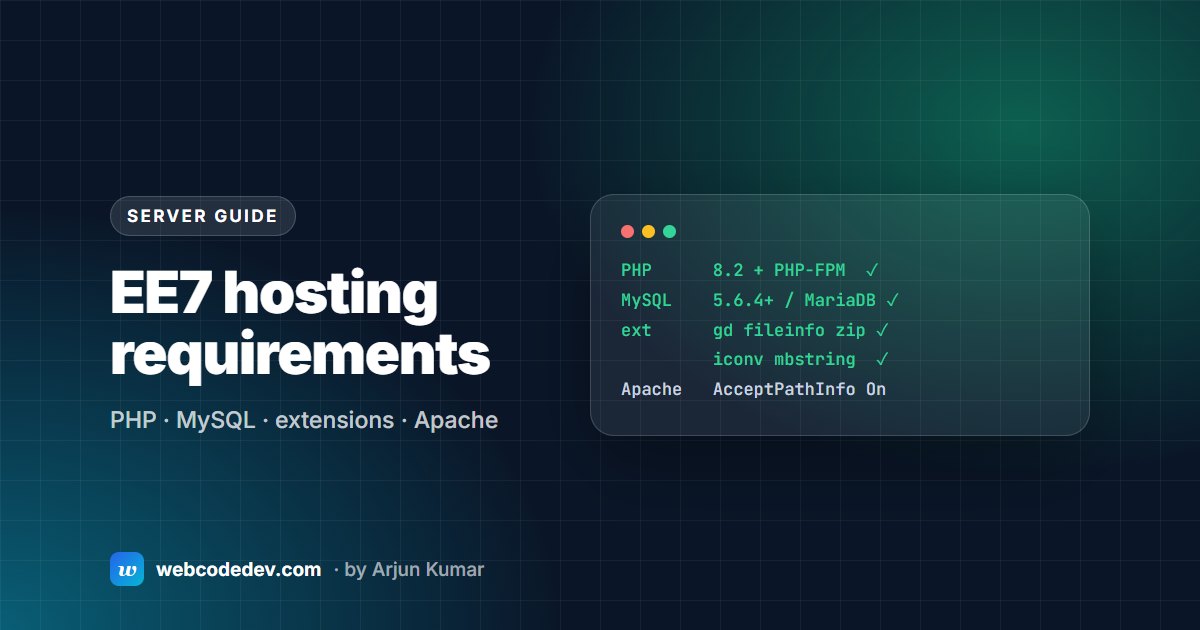
ExpressionEngine 7 needs PHP 7.2.5 or newer (PHP 8.2 with PHP-FPM recommended; 8.3 fully supported), MySQL 5.6.4+ or MariaDB, and the GD, fileinfo, ZIP, iconv and mbstring PHP extensions. On Apache, AcceptPathInfo must be on for clean URLs.
Whether you're moving an ExpressionEngine site to new hosting or checking why one misbehaves, these are the requirements that matter. Everything here comes from the official EE system requirements, plus what we set up on client servers.
PHP
- Recommended: PHP 8.2 (or 7.4) running with PHP-FPM.
- Fully supported: PHP 8.3. Some third-party add-ons lag behind core, so check yours.
- Absolute minimum: PHP 7.2.5 with 32M of memory. That's for older environments only; don't plan a new server around it.
Our advice for 2026: PHP 8.2 or 8.3. PHP 8.2 is the oldest branch that still gets security fixes, and the October 2026 PHP security alert lists the minimum patched release for each branch.
Required PHP extensions
- GD (or GD 2), for image resizing and thumbnails
- File Information (
fileinfo) - ZIP
- iconv
- Multibyte String (
mbstring)
Recommended: Internationalization (intl), needed for the full set of variable modifiers.
Most cPanel hosts have these on by default. If not, they're usually a checkbox in the PHP extensions screen.
Database
- MySQL 5.6.4 or newer (MySQL 8 is fine), or Percona 5.6+.
- MariaDB works as a drop-in replacement.
- The database user needs:
SELECT,INSERT,UPDATE,DELETE,CREATE,INDEX,ALTER,DROP.
A user without ALTER or CREATE is a common cause of failed updates, because upgrades change table structures.
Web server
- Apache: turn on
AcceptPathInfo, or clean URLs won't work. AddAcceptPathInfo Onto.htaccess, or ask your host. - Live Preview on Apache: if you see "HTTP Authorization Header Missing", add
SetEnvIf Authorization "(.*)" HTTP_AUTHORIZATION=$1to.htaccess. - Nginx: works well. Route requests through
index.phpthe same way you would for any PHP CMS.
EE includes a Server Compatibility Wizard that checks a server against these requirements before you install.
What we add on top
The minimums get EE running. For a site that's fast and safe:
- OPcache on, so PHP doesn't recompile EE on every request.
- HTTPS everywhere, with HSTS once you're sure every subdomain has a certificate.
- Long cache headers for themes and uploads (
themes/,images/), so repeat visits are fast. - Off-server backups of files and database, tested.
- A staging copy with its own database, so updates are tested before live.
- Error logs you can reach. Most "white screen" problems are solved by reading them.
Moving hosts?
The most common EE move problems are paths and URLs stored in config.php and the database, file permissions on system/user/cache/, and a different PHP version on the new server. Our server migration service handles all of that, and our upgrade errors guide covers what to check if something breaks.
Frequently asked questions
What PHP version does ExpressionEngine 7 need?
At least PHP 7.2.5, but the EE docs recommend PHP 8.2 with PHP-FPM, and PHP 8.3 is fully supported. Use 8.2 or 8.3 for security fixes.
Does ExpressionEngine work on shared cPanel hosting?
Yes, as long as the host offers a supported PHP version, the required extensions and a MySQL or MariaDB database.
Does ExpressionEngine work with MariaDB?
Yes. The EE docs describe MariaDB as a drop-in replacement for MySQL.